Pre-release · masterOpen source · Apache-2.0 · For the pi coding agent

Every agent session, one calm workspace. On your desk, or folded in your pocket.

Sova is where you run the pi coding agent: one browser workspace that fits a desktop, an unfolded foldable, or a phone. Delegate hands the work to subagents you can follow, each with its own transcript, and you read every change as steps before it lands.

curl -fsSL https://raw.githubusercontent.com/Naomarik/sova/master/scripts/install.sh | SOVA_REF=master bash

Then run sova, and sova open to open it. Needs Git, Node.js ≥22.19, pnpm (or npx), curl, and unzip or python3; the installer downloads its own pinned Bun. Sova runs on the pi coding agent, and the install brings its own copy.

On your desk
Unfolded
Folded

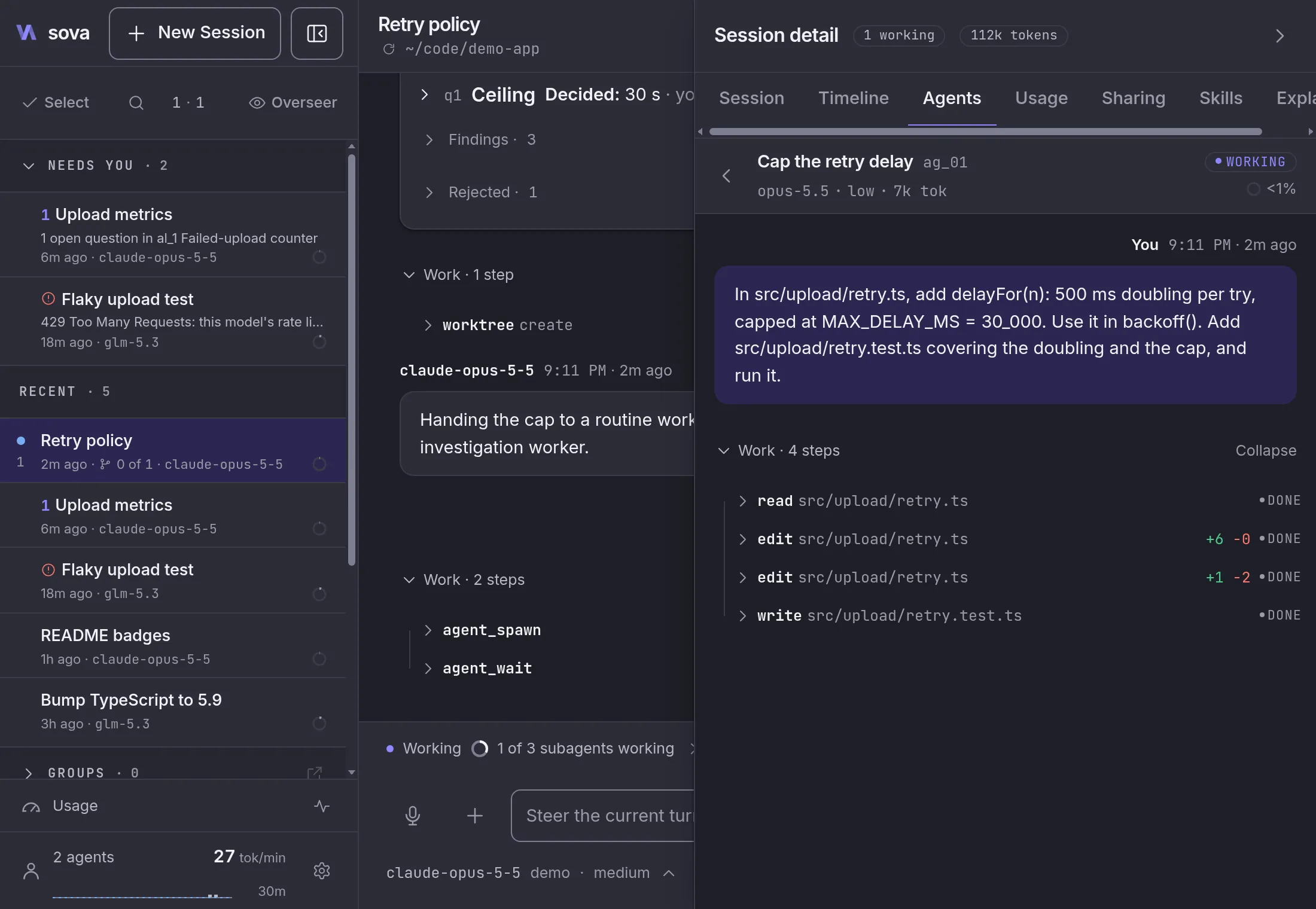
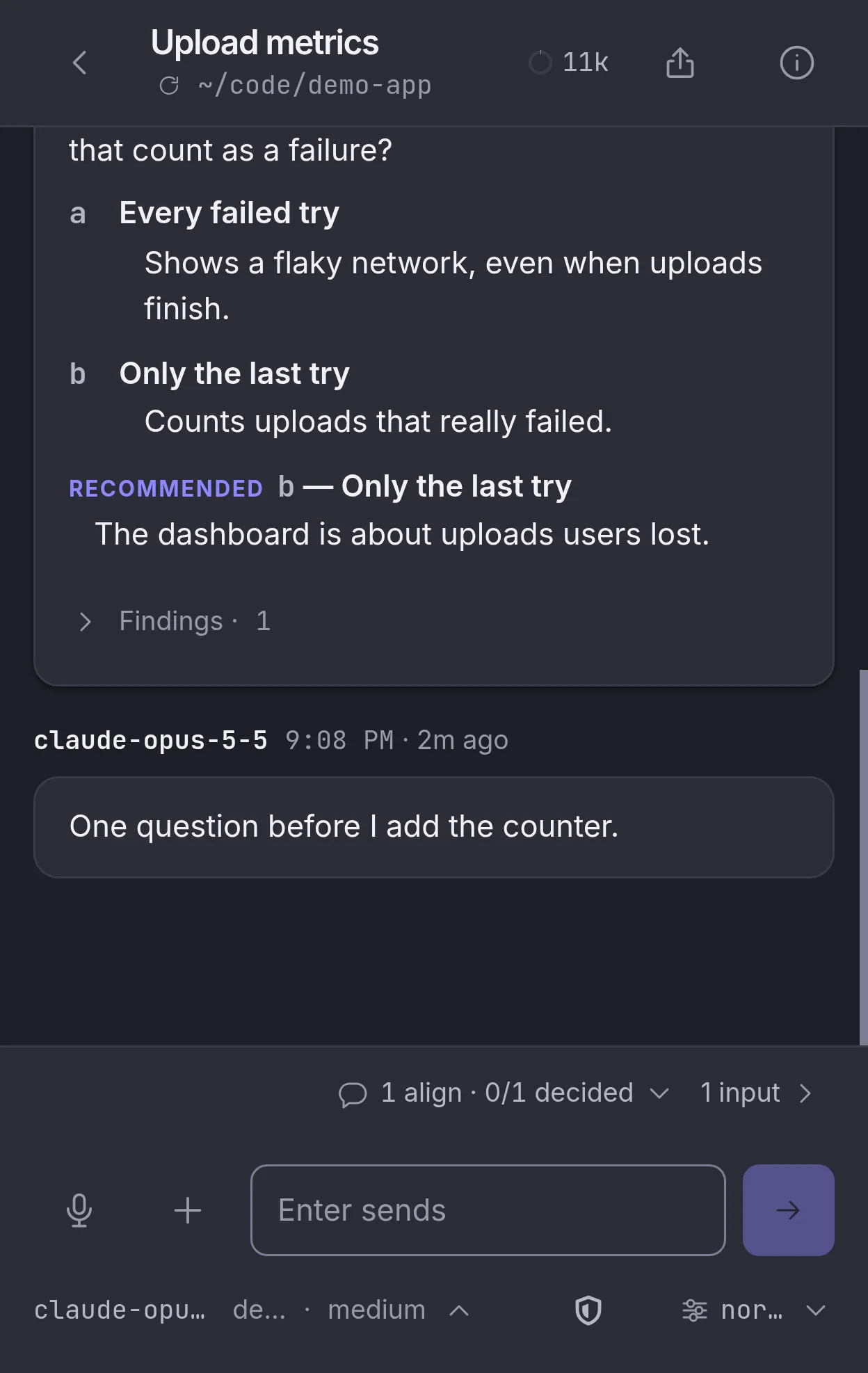
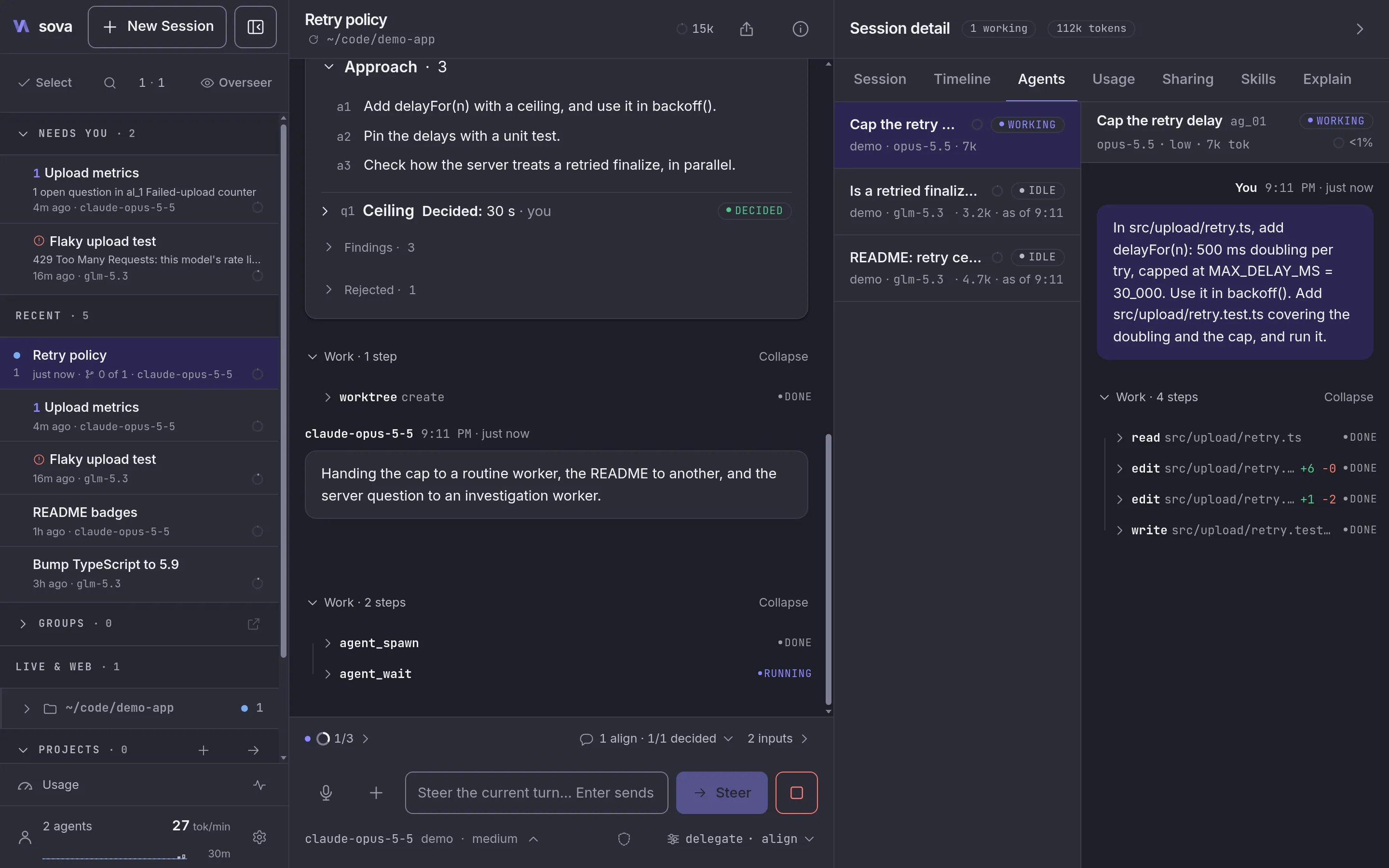
One session, Retry policy, shown 3 ways. On a desktop: the sessions sidebar with 1 session that needs you, the chat in Delegate mode handing work to 3 workers on different models, and the workers pane with each worker's model, state and context, its worktree, and the running worker's transcript. On an unfolded foldable: the sidebar on the left and the chat on the right. On a folded phone: the chat alone, with the 3 workers listed inline.

Your sessions, read in place
~/.pi/agent
Loopback by default
127.0.0.1:4800
Token-gated, one token per install
sova/auth-token
Read it, fork it
Apache-2.0
What you get

More work, less window switching.

Sova is for people who already run coding agents. Hand the work to subagents, agree on the plan before they build, and read every change before it lands. Your sessions, logins, and pi extensions come with you.

01 Delegate

Hand the work to subagents. Follow every one.

Switch a session to Delegate and its agent becomes an orchestrator. It sorts the work into planning, investigation, routine changes, and complex changes, and sends each kind to the model you routed it to, on Claude Code or any provider pi has, with an optional fallback. A subagent profile keeps those routes and your team defaults under one name, so a usage limit is 1 switch away from another setup.

Bigger jobs get a team: coordinated workers with one role each. Every worker and team member opens in the side pane with its own transcript and how full its context is. If Sova restarts, each worker comes back as an idle record with its transcript, and picks up again when asked.

Routes live in Settings → Subagents. The shipped routes use Claude Code models, so install the claude CLI or pick your own.

Read more about Delegate Subagent profiles

A session's workers pane: 3 workers on 2 backends, Claude Code and pi, with their models and context rings, one worker's transcript open beside them, and the 2 git worktrees the session works in, one of them merged.
02 Alignments

Agree on the plan before anything gets built.

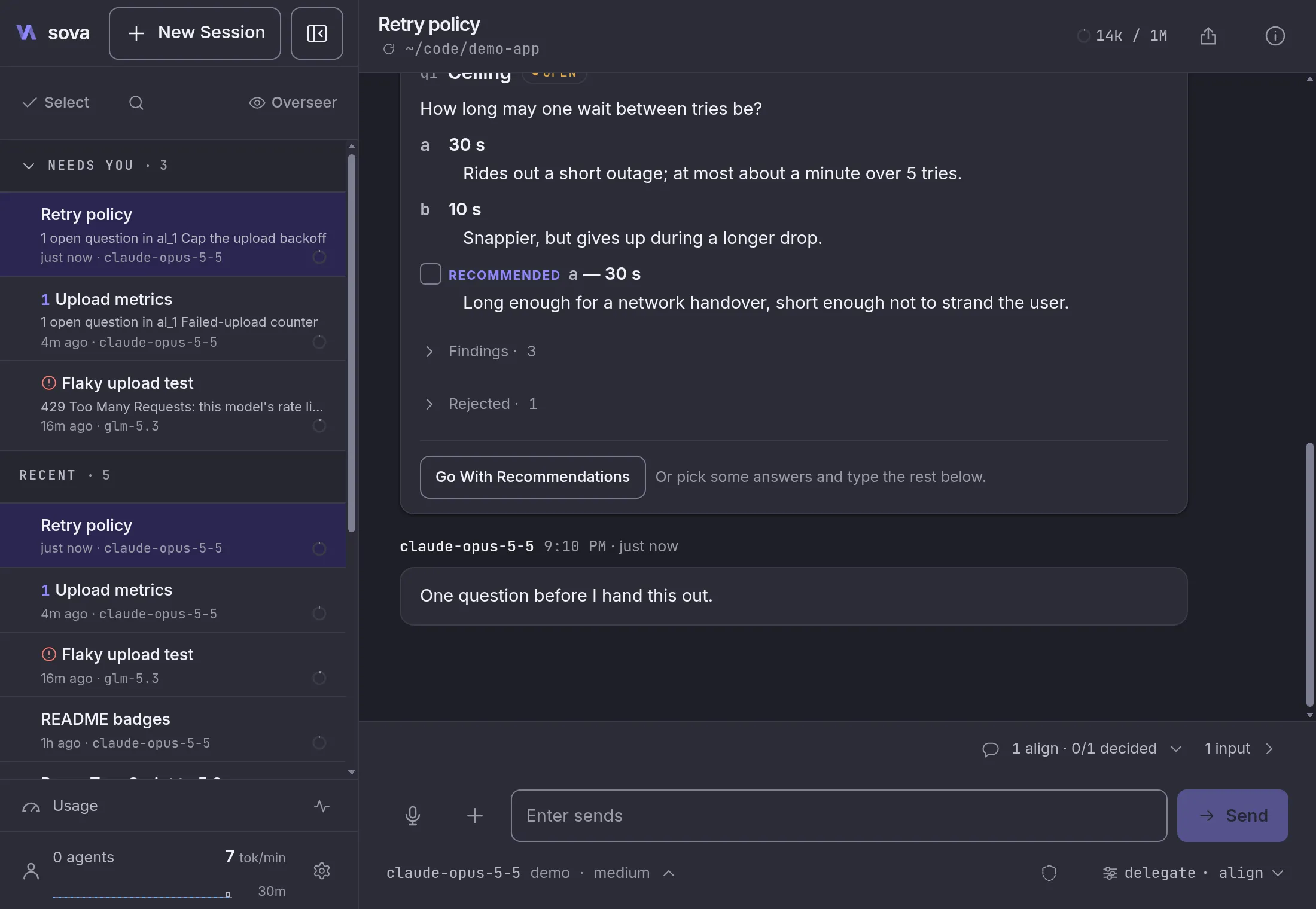
Turn on align and the agent works out what to build with you first. It records each agreement as an alignment: what it found, the approach, the alternatives it rejected and why, and its open questions, each with a recommendation. Answer in chat, even as just “1a”.

With adversarial review on, a fresh read-only reviewer checks the plan, and later the finished diff of complex work. What it finds is recorded on the alignment.

Adversarial review is experimental and off by default: Settings → Experimental.

Read more about alignments Adversarial review

An alignment card in a session transcript: the plan's 3 entries, including one rejected alternative with why, and an open question with 2 lettered options and the agent's recommendation. Below it, the composer counts 1 alignment with 0 of 1 questions decided, and its mode switch reads delegate · align.
03 Worktrees and changes

Worktrees the session keeps track of. Changes you review as steps.

A session keeps track of the git worktrees it works in. Ask the agent to create, attach, detach, merge, or list them; detaching deletes nothing. Workers start only in the session's folder or one of its worktrees, and each merge lands in the transcript as a card.

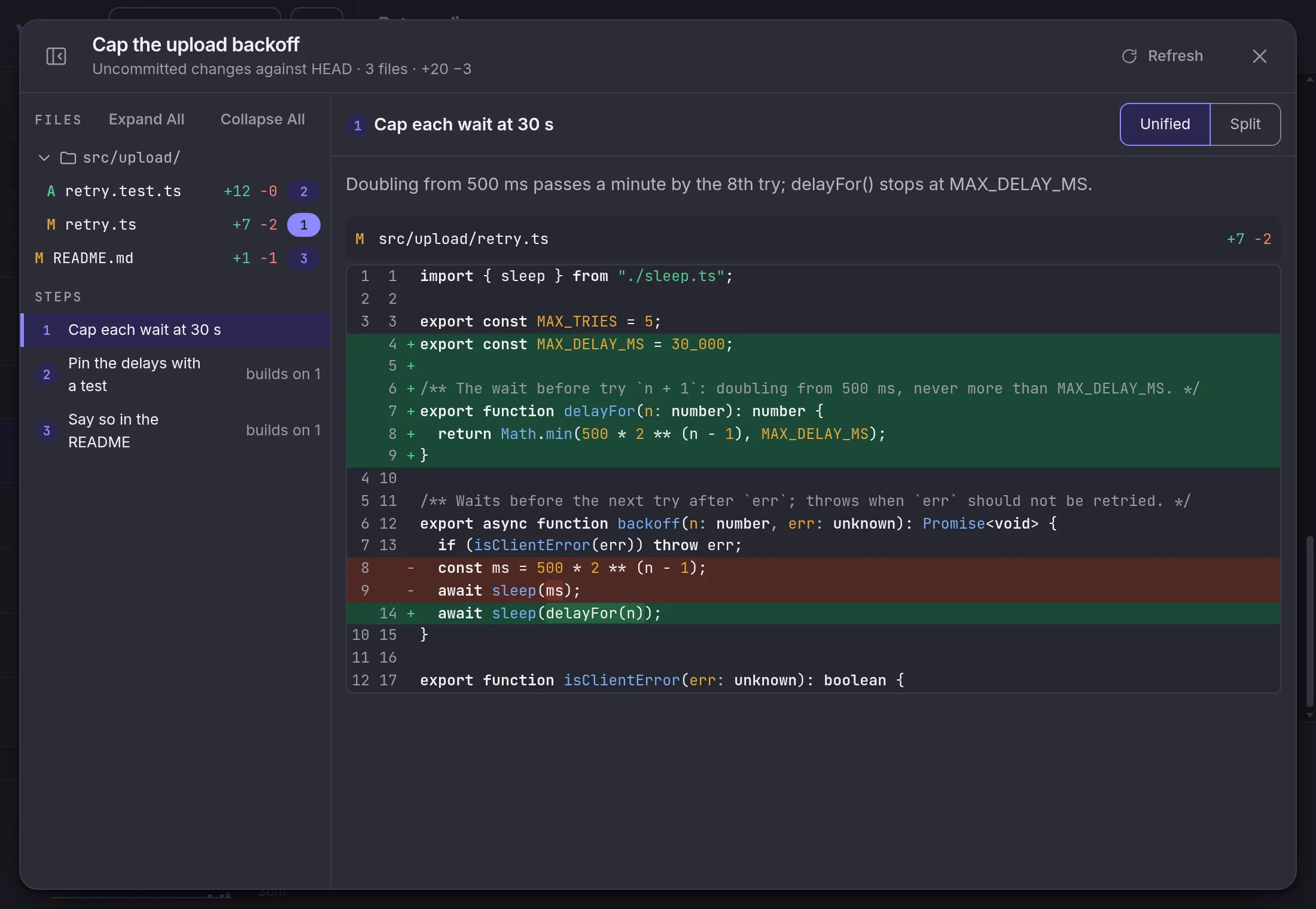
Ask to see what changed and the agent lays it out as numbered steps, each with a line on why. It can't leave a hunk out: with more than one hunk, every one has to sit in a step. The changes viewer shows them a step or a file at a time, and only reads: it never writes to your working tree or runs a git command that changes anything.

Sova never removes a worktree on its own. A new session offers Clean Up Merged, which shows what goes and what stays before it removes anything.

Read more about worktrees and changes

The changes viewer for a worktree: 3 numbered steps the agent wrote, each with a line on why, then the 3 changed files; step 1 is open, showing its why and the one hunk it placed.
04 Needs you

Know which session needs you, even away from the desk.

The sidebar's Needs you list shows every session waiting on you: an open question, an error, a failed worker. Turn on notifications and the same news reaches your phone's lock screen, even with Sova closed. Neither makes a model call.

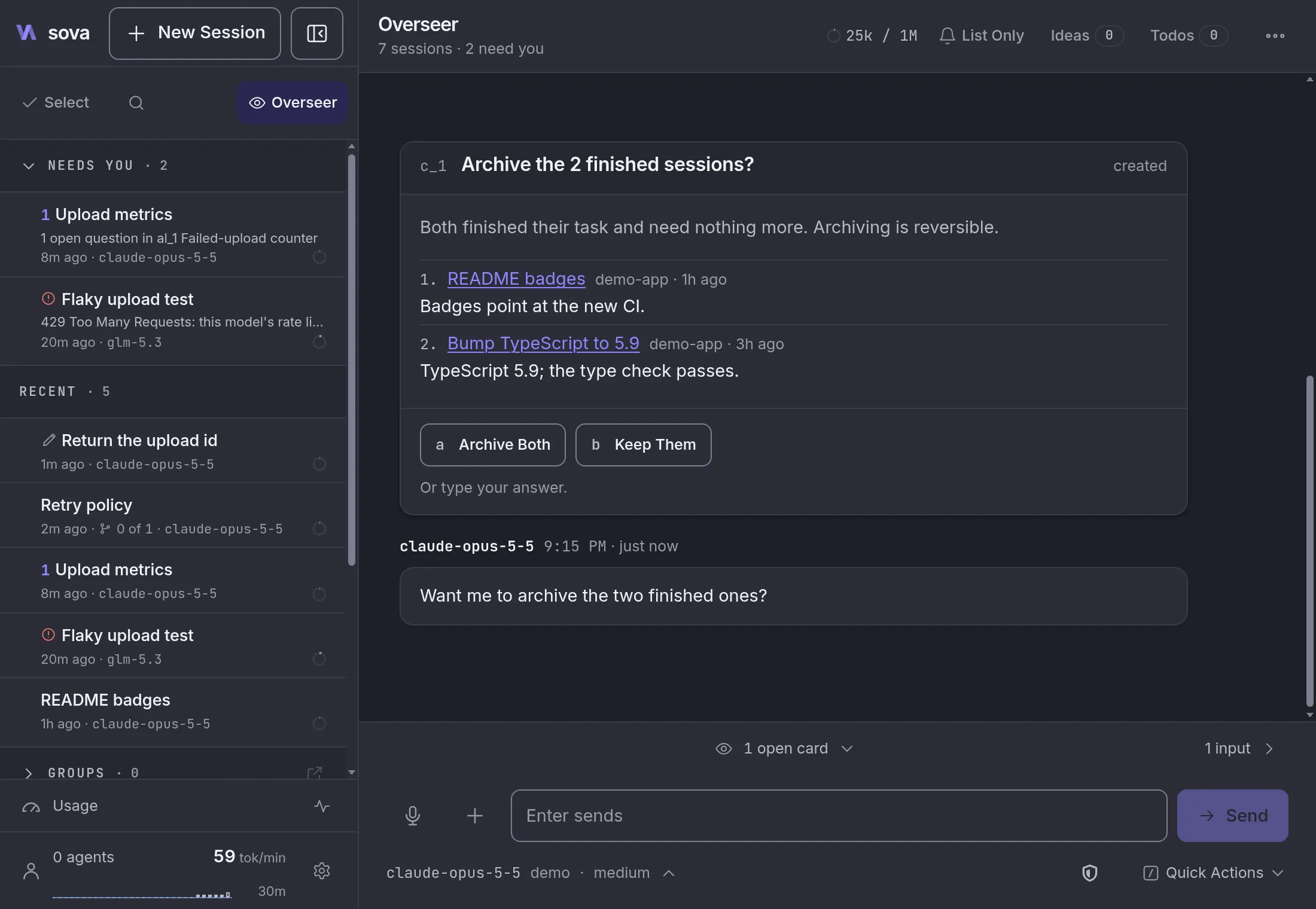
The Overseer is a session that reads every other one. Ask it what needs you, or to start sessions, send prompts, or tidy up. When a request is ambiguous or risky, it asks first, with a card that lists each session it would touch and why. It also keeps your ideas and todos from plain chat.

  • List Only, the default, fills the Needs you list and costs no tokens.
  • No shell and no file edits: the Overseer acts through Sova, with limits per turn you can set.

Notifications need Sova on an HTTPS address, such as one from tailscale serve. On iPhone, add Sova to the Home Screen first.

Read more about Needs you The Overseer

The Overseer page: it lists the 2 sessions that need you with links to each, then asks with a confirmation card before archiving 3 finished sessions. Beside it, a phone's lock screen shows the same 2 sessions as Sova notifications: one needs input, one stopped with an error.
05 On your phone

Check in from your phone.

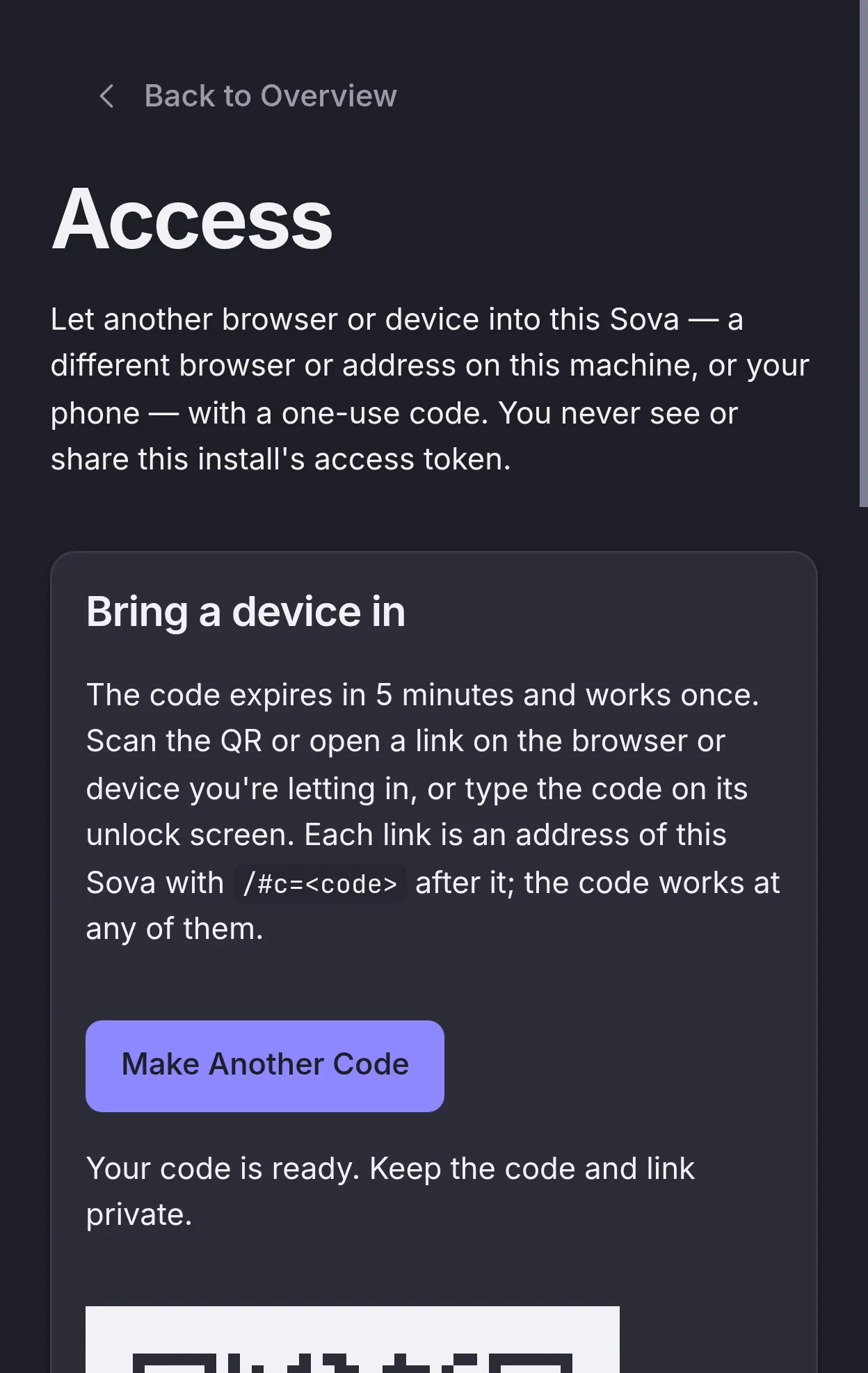
On a phone the layout folds to one column and installs as an app. To let it in, open Access in Sova, make a one-use code, and scan its QR; the code expires in 5 minutes. Then answer a question, steer a turn, or start a session, the same as at the desk.

With notifications on, a session that needs you reaches the lock screen; tapping it opens that session, or the Overseer when several need you.

Already have sessions in pi's terminal? They're listed as they are and stream live, no import.

Sova listens on 127.0.0.1. For a phone to reach it, serve it on your tailnet with tailscale serve, or put your own HTTPS proxy in front. Notifications need that HTTPS address; on iPhone, add Sova to the Home Screen first.

Read more about checking in from your phone

Sova's Access page on a desktop, showing a one-use pairing QR that expires in 5 minutes. Beside it, the phone that scanned it, in Sova's folded layout: a session asks whether to count a retry as an error, with its 2 answers as buttons.
06 Change direction

Rewind, regenerate, fork, steer. Keep the context you built.

Rewind to before any message you sent, regenerate a reply, or fork from a reply. Steer a running turn without stopping it, and switch models mid-session. Tool calls read as cards and edits as diffs, so you follow the work without scrollback.

Read more about changing direction

A session transcript: your message with Copy, Share and Rewind actions, a reply with Copy, Regenerate and Fork, an edit rendered as a diff, a queued follow-up message, and the composer offering Steer and Stop while the turn runs.
And the rest

Small things that add up.

  • Claude logins, with failover

    Chat with Claude Code's models and run workers on the Claude Code CLI. Add more Claude logins in Settings → Accounts, and a session or worker that hits a usage limit moves on to the next one.

    Needs the claude CLI installed and logged in; Claude Code does every sign-in.

  • A sandbox per session

    Off, Subagents only, or On. On runs a session's bash in an OS sandbox (bubblewrap on Linux, Seatbelt on macOS) and checks every file tool's path against the same policy. Subagents only, the default, keeps a worker in a worktree writing only there.

    It contains an agent's mistakes. It isn't a boundary for hostile code, and it hasn't been audited.

  • Playbooks and schedules

    Markdown recipes an agent runs against a project. Sova ships 5, among them a spec review, a marketing kit, and a brand kit. Pick one from the composer, add a line of your own, and send. A project's playbook can also run by itself on a schedule.

    Yours live in ~/.pi/agent/sova/playbooks/. A schedule fires only after you approve it.

  • Share a session

    Send a read-only link to a whole session or just part of it, as a snapshot or following live, one link per recipient. You see who opened each one.

    Needs an address you set up: docs/public-links.md. Recipients need no account or tailnet.

  • Tools on your own targets

    Run a session's tools on your own SSH, AWS SSM, Docker, or Incus targets. Tools run on the target, not through a local mount.

    Needs your targets listed in ~/.pi/agent/targets.json.

  • Usage, agents, and load

    The Usage page shows your subscription and spend windows, and the Agents page what's running. The resource monitor charges CPU and memory to the session and worker that started each process.

    The monitor only reads.

  • Your model rules

    Settings → Models decides which models this machine may use, and which may be given to subagents. A disabled model is never silently swapped for another. Each provider can also take a limit on requests at once; the rest wait in a queue instead of failing with a 429.

    Saved in ~/.pi/agent/model-policy.json and provider-limits.json.

  • Voice input

    A mic in every composer. A local speech model on your Sova host turns the clip into text at the caret, and nothing sends until you do.

    Set up once in Settings → Voice: a whisper.cpp build and a 574 MB model. Audio goes only to your Sova host.

Beyond one machine Preview

More hosts, more people.

Two newer parts of Sova, each with its own page. Both need setup beyond the install.

Make it yours

18 themes. Yours is 1 JSON file.

Pick a built-in theme in Settings → Themes, or save your own in ~/.pi/agent/sova/themes/. While the Themes tab is open, the picker picks it up within 2 seconds. No rebuild, no restart.

// ~/.pi/agent/sova/themes/desk-lamp.json
{
  "name": "Desk Lamp",
  "extends": "dark",
  "vars": { "amber": "#ffb454" },
  "colors": {
    "accent": "$amber",
    "accent-tint": "#3a2f1c"
  }
}
  • Darkdark
  • Lightlight
  • Catppuccin Frappédark
  • Catppuccin Lattelight
  • Catppuccin Macchiatodark
  • Catppuccin Mochadark
  • Draculadark
  • Monokai Classicdark
  • Monokai Machinedark
  • Monokai Prodark
  • Monokai Ristrettodark
  • Nord Auroradark
  • Nord Classicdark
  • Nord Frostdark
  • Nord Lightlight
  • Tokyo Night Daylight
  • Tokyo Night Moondark
  • Tokyo Night Stormdark
How it works

One process that runs pi, on your machine.

Sova is a server, on Bun by default and Node if you ask, with the pi coding agent embedded, plus a web app. It uses pi's own agent directory: your sessions, your logins, your extensions.

Your browser

The desktop workspace, or the folded layout installed on a phone.

  • sessions and groups
  • transcripts and diffs
  • settings and themes

sova server

Hono and the pi SDK, on 127.0.0.1:4800 by default.

  • runs pi sessions
  • runs workers and the Overseer
  • checks the install's token

~/.pi/agent

pi's agent directory. Sova's own state lives in sova/.

  • sessions/*.jsonl
  • auth.json
  • extensions/
  • sova/

pi's terminal UI

Optional. A session it has open streams into Sova live, and stays read-only there.

Model requests go from Sova to your configured provider. Tools and extensions may use the network too.
Before you install

What it touches, and what it doesn't.

Sova shares a directory with a process you trust, so here's the whole list.

  • Not a hosted service. It runs on your machine.
  • Not a team app. One person runs it; the people you ask see only the conversation you share.
Install
~/.local/share/sova, with the pinned Bun it downloads kept inside it, and a ~/.local/bin/sova launcher. No sudo, no system packages, no version manager, no shell-profile edits.
pi extensions
One link per Sova extension in ~/.pi/agent/extensions/. Anything already there that isn't its own link is left alone. --no-extensions skips this.
Settings
None. The installer writes no settings, pi's or its own. Claude Code's models are always on, and work once the claude CLI is installed and logged in.
Login service
Only if you say yes, or pass --service: a per-user service that starts Sova at login and restarts it if it exits. launchd on macOS, a systemd user unit on Linux. No sudo.
Your sessions
Read in place. A session open in a terminal is read-only here.
Sova's state
Groups, drafts, archive, and themes, in ~/.pi/agent/sova/, and each organization's workspace repo.
Network
Model requests go to your configured provider. Tools and extensions may use the network.
Access
Single user, loopback by default, and one token per install, in ~/.pi/agent/sova/auth-token. sova open opens the page already unlocked; a phone or another browser pairs once with a one-use QR code from Access. Delete the token file and restart Sova to sign every browser out. The token is all that stands between your network and an app that runs commands as you.
Share listener
Off unless you set it. It serves only shared conversations and the owner page; every other path answers 404.
Mesh
Off until you add a peer. Then a second port on your tailnet address only. With login sync on, your provider logins are copied to every host.
Re-running
Updates to master's latest commit, and changes nothing when it's already there.
Open source

Apache-2.0, built in the open.

TypeScript end to end: a SolidJS web app, a Hono server with the pi SDK embedded, and the pi extensions it ships in pi-config/. Read the code, file an issue, or run a checkout.

# Run a checkout: Git, Node.js ≥22.19, pnpm, and Bun 1.4.2
git clone https://github.com/Naomarik/sova.git
cd sova
pnpm install --frozen-lockfile
pnpm run build
pnpm start   # http://127.0.0.1:4800, on Bun
pnpm start --node   # the same, on Node

Run your next pi session here.

Sessions you already have show up as soon as it starts. To chat, it uses the provider login you already have, or you log in once from the bundled CLI.

curl -fsSL https://raw.githubusercontent.com/Naomarik/sova/master/scripts/install.sh | SOVA_REF=master bash

Then run sova, and sova open to open it. Keep it running while you use the app; Ctrl+C stops it.